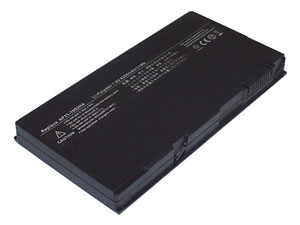
4200mAh Replacement ASUS AP21-1002HA Laptop Battery
Battery type: Li-Polymer
Voltage: 7.40V
Capacity: 4200mAh
Color: Black
Dimension: 140.50x73.10x13.10mm
Battery ID: 447
Product Code: 436-NAA051
Warranty: New and 1 year warranty!
Our Price: $45.36
*Please ensure the product(s) that you are going to buy fits the brand, model and part number of your device.
ASUS
ASUS
Useful information for our ASUS AP21-1002HA laptop battery
Notice:
Please Carefully check the Part Number, Pictures and the compatibility before bidding for the item! Feel Free contact us if you are not sure.
1. Li-Ion Laptop Battery 10.8V and 11.1V are in common use.
2. Li-Ion Laptop Battery 14.4V and 14.8V are in common use.
3. Li-Ion Laptop Battery 7.2V and 7.4V are in common use.
If your model not listed above, please email us your model number, then, we will help you find one that suit for you.
Our Price:
You just pay the lowest price to get this high quality ASUS AP21-1002HA laptop battery
Our guarantee:
100% brand new ASUS AP21-1002HA laptop battery pack.
NOT Refurbished.NOT Used.NOT COPY ! Tested Fine !
30 days money back.1 year warranty for ASUS AP21-1002HA laptop battery
Our delivery time
We will ship your ASUS AP21-1002HA laptop battery within 24 hours after payment confirmed in business days.
Our service:
Our Technical Support Department will do its best to answer all pre-sales and post-sales questions for your ASUS AP21-1002HA laptop battery. Any emails will be answered within 24 hours.
please email us via [email protected]
How to maximize the performance of your ASUS AP21-1002HA laptop battery
Will my ASUS AP21-1002HA laptop battery be influenced by Memory Effect?
First.You should check the type of your ASUS AP21-1002HA laptop battery.If it is a Li-Ion battery.You don't need to worry about the memory effect.As Li-Ion batteries are not suffer from the memory effect.However.If the battery type is Nickel Cadmium(NiCd) or Nickel-Metal Hydride(NiMH).You should remember keep your ASUS AP21-1002HA laptop battery be charged at least once every two or three weeks.
Do I need fully charged my new ASUS AP21-1002HA laptop battery before i use it?
New ASUS AP21-1002HA laptop battery batteries should be fully charged before use.To put your ASUS AP21-1002HA laptop battery in optimum condition for long-term uage.Please fully charge it before its first use.for the first 3 charge cycles.Always fully charge your ASUS AP21-1002HA laptop battery before use and fully discharge before recharging.
Should I clean my ASUS AP21-1002HA laptop battery if i work in the dreadful conditions?
Absolutely.It is very necessary to Keey your ASUS AP21-1002HA laptop battery clean.You'd better clean the dirty battery contacts with a cotton swab and alcohol.This keeps the transfer of power from your ASUS AP21-1002HA laptop battery more efficient.
How to Take care of my ASUS AP21-1002HA laptop battery?
Do not leave your ASUS AP21-1002HA laptop battery dormant for long periods of time.You'd better use your battery at least once every two or three weeks.
How to deal with my ASUS AP21-1002HA laptop battery when it not in use?
For some reasons.You will not use the battery for a month or more days.You should put it in a clean,dry and cool place.When you do it.Please ensure the battery has at least 70% charge remaining.As the battery will do a slow self-discharge.We don't suggest you store it for a very long time.